
Traefik gives you a real front door. It terminates TLS, discovers your services as they start and stop, routes by host and path, load-balances across replicas, retries failed backends, and chains middlewares for auth, redirects, rate limits, and headers. What it does not do, out of the box, is look at what is inside the requests it forwards. Traefik’s job is to deliver the request; deciding whether that request is an attack was always someone else’s.
That someone is a WAF, and on Traefik it slots in exactly where the gap is: as one more middleware in the chain. CrowdSec gives you an open-source one, and you can switch it on the safe way first. That safe way is virtual patching, which blocks the specific shapes of known exploits and known-bad paths and leaves everything else untouched. You get real protection immediately, with no tuning required.
This guide takes a Traefik + Docker Compose stack from no request inspection to a working WAF in virtual-patching mode, the safest way to start, because it refuses attacks it can name without ever getting in your users’ way.
Why Traefik needs a WAF of its own
Three reasons this earns a place in your middleware chain.
You are running code you did not write. Traefik almost never sits in front of your own application. It fronts other people’s: a self-hosted dashboard, a vendor’s container, an app built on a framework you pulled from a registry. You cannot add a security library inside software you do not maintain, and you are not going to audit all of it. Traefik is the one place every one of those requests passes through in the clear, which makes it the only practical place to inspect them. A WAF here protects the apps you depend on but do not control.
It closes the gap between a CVE and your upgrade. When a vulnerability in a popular app goes public, mass scanning for it starts within hours, the same internet-wide spray that finds every new host within minutes of it coming online. Your realistic window to read the advisory, test the patch, and roll it out is measured in days. Virtual patching covers that gap: the moment a rule for the exploit’s shape ships, the WAF refuses that request at the edge, whether or not the app behind it is patched yet. You stop racing the scanners and buy the time to upgrade on your own schedule.
Its rules come from a network, not just a file. A classic WAF knows exactly what its own signature set knows, and nothing more. CrowdSec’s is fed by every other engine running it: an IP caught probing someone else’s server becomes an IP yours refuses before it ever reaches your apps, and the same Traefik plugin enforces those community bans in the same pass as the WAF verdict. Your defense gets sharper because everyone else’s is running too, something a lone WAF, however good its rules, cannot do.d, first-party path is gone, and rebuilding a dynamic module against every Nginx release was never anyone’s idea of fun. ModSecurity earned its place; it is not the villain of this story. But if you are choosing a WAF for Nginx in 2026, you want something actively maintained and open source.
What “CrowdSec’s WAF” actually is on Traefik
Two pieces do the work, and it helps to know which is which before you touch a config file.
- The AppSec component is an HTTP server bundled inside the CrowdSec agent. It holds the rules and returns a verdict, allow or block, for any request it is shown. It does not sit inline with your traffic.
- The Traefik bouncer is a middleware plugin (maxlerebourg/crowdsec-bouncer-traefik-plugin), loaded through Traefik’s built-in Yaegi engine, with no separate binary and no sidecar. It intercepts each request, shows a copy to AppSec, and enforces whatever verdict comes back.
client ───▶ traefik ───▶ bouncer plugin ───▶ AppSec (crowdsec:7422)
                         │                    │
                         │          verdict ◀─┘
                         ▼
                    allow (200) / block (403)
Key points:
- AppSec is the brain, the plugin is the muscle. AppSec never blocks anything itself; the plugin does.
- The verdict round-trip stays on the Docker network, so it costs microseconds, not an internet hop.
- The same plugin that enforces WAF verdicts also enforces IP bans from CrowdSec’s community blocklist. One middleware, two jobs.
- The plugin speaks the same protocol to the same AppSec component that the Nginx, HAProxy, Caddy, and Envoy bouncers do, so the WAF rules and verdicts are identical whatever proxy you run.
Full reference: the AppSec component docs.
Prerequisites
- A host with Docker and the Compose plugin.
- Outbound HTTPS to the CrowdSec hub (rules) and
api.crowdsec.net(community signals).
That is the whole list. No database to stand up, no proxy rearchitecting; the WAF slots in as one more middleware.
Step 1 — Stand up CrowdSec next to Traefik
The whole stack is one Compose file: the CrowdSec agent (which carries the WAF), Traefik, and a whoami container as the app to protect.
# docker-compose.yml
services:
  crowdsec:
    image: crowdsecurity/crowdsec:v1.7.8
    container_name: crowdsec
    restart: unless-stopped
    environment:
      COLLECTIONS: "crowdsecurity/appsec-virtual-patching crowdsecurity/appsec-generic-rules"
      BOUNCER_KEY_traefik: "${BOUNCER_KEY_TRAEFIK}"
    volumes:
      - ./acquis.d:/etc/crowdsec/acquis.d
      - crowdsec-config:/etc/crowdsec        # persist config, credentials, Console enrollment
      - crowdsec-data:/var/lib/crowdsec/data
    networks: [web]

  traefik:
    image: traefik:v3.5
    container_name: traefik
    restart: unless-stopped
    depends_on: [crowdsec]
    ports: ["80:80"]
    volumes:
      - ./traefik.yml:/etc/traefik/traefik.yml:ro
      - ./dynamic:/etc/traefik/dynamic:ro
      - traefik-plugins:/plugins-storage
    networks: [web]

  whoami:
    image: traefik/whoami:latest
    container_name: whoami
    restart: unless-stopped
    networks: [web]

networks:
  web:
volumes:
  crowdsec-config:
  crowdsec-data:
  traefik-plugins:
Two lines in the crowdsec service do the heavy lifting. COLLECTIONS installs the virtual-patching rule sets on first boot. BOUNCER_KEY_traefik mints a fixed API key for the plugin, so it authenticates on start with no manual key copying. Pick any long random string and set it in a .env file next to the Compose file:
echo "BOUNCER_KEY_TRAEFIK=$(openssl rand -hex 24)" > .envTell the AppSec component to listen, in acquis.d/appsec.yaml:
# acquis.d/appsec.yaml
appsec_config: crowdsecurity/appsec-default
labels:
  type: appsec
listen_addr: 0.0.0.0:7422
source: appsec
Bring it up and confirm AppSec is listening:
$ docker compose up -d
$ docker compose logs crowdsec | grep Appsec
crowdsec | Appsec listening on 0.0.0.0:7422
$ docker exec crowdsec cscli metrics show appsec
 Appsec Engine | Processed | Blocked
 0.0.0.0:7422/ | 0         | 0
Key points:
- Install both collections together.
crowdsecurity/appsec-defaultdraws on rules fromappsec-virtual-patchingandappsec-generic-rules; the pair gives you the complete virtual-patching set. - AppSec binds
0.0.0.0:7422, not127.0.0.1.Loopback inside the CrowdSec container is unreachable from the Traefik container; they only share thewebnetwork. The listener is not published to the host, so it is not exposed outside Docker. - Persist both volumes.
crowdsec-dataholds the decisions and alerts database;crowdsec-configholds/etc/crowdsec, where your API credentials and Console enrollment live. Leave the config volume out and adocker compose downdrops the enrollment, so you re-enroll after every recreate. - At this stage CrowdSec detects. It does not yet block anything reaching Traefik; that is the plugin’s job, next.
Step 2: Load the plugin and wire the middleware
Register the plugin in Traefik’s static config, and trust the proxy hop so Traefik keeps the real client IP:
# traefik.yml (static)
entryPoints:
  web:
    address: ":80"
    forwardedHeaders:
      trustedIPs:
        - "172.16.0.0/12"      # the Docker network / any LB in front of Traefik

experimental:
  plugins:
    bouncer:
      moduleName: github.com/maxlerebourg/crowdsec-bouncer-traefik-plugin
      version: v1.6.0

providers:
  file:
    directory: /etc/traefik/dynamic
    watch: true
Then define the middleware (and attach it to a router) in the dynamic config:
# dynamic/middlewares.yml
http:
  routers:
    whoami:
      rule: "PathPrefix(`/`)"
      entryPoints: [web]
      service: whoami
      middlewares: [crowdsec]        # every request is screened by the WAF

  services:
    whoami:
      loadBalancer:
        servers:
          - url: "http://whoami:80"

  middlewares:
    crowdsec:
      plugin:
        bouncer:
          enabled: true
          crowdsecMode: stream               # poll the decision list (prod default)
          updateIntervalSeconds: 10          # a fresh ban lands within this window
          crowdsecLapiScheme: http
          crowdsecLapiHost: crowdsec:8080    # LAPI, over the Docker network
          crowdsecLapiKey: ""   # == BOUNCER_KEY_traefik above
          crowdsecAppsecEnabled: true        # turn ON the inline WAF
          crowdsecAppsecHost: crowdsec:7422  # the AppSec listener
          forwardedHeadersTrustedIPs:
            - "172.16.0.0/12"
Reload Traefik (or let the file provider pick it up, since watch: true) and confirm the plugin registered as a bouncer:
$ docker exec crowdsec cscli bouncers list
 Name    Valid  Type                             Version  Auth Type
 traefik  ✔️     Crowdsec-Bouncer-Traefik-Plugin  1.5.0    api-key
Prove the enforcement path works before trusting the WAF with anything. Ban an IP, wait one stream interval, and present it as the forwarded client:
$ curl -s -o /dev/null -w 'before ban: %{http_code}\n' -H 'X-Forwarded-For: 192.168.1.142' http://127.0.0.1/   # 200
$ docker exec crowdsec cscli decisions add --ip 192.168.1.142 --duration 5m --reason test
$ curl -s -o /dev/null -w 'after ban:  %{http_code}\n' -H 'X-Forwarded-For: 192.168.1.142' http://127.0.0.1/   # 403
$ curl -s -o /dev/null -w 'clean IP:   %{http_code}\n' -H 'X-Forwarded-For: 192.168.1.1'  http://127.0.0.1/   # 200
$ docker exec crowdsec cscli decisions delete --ip 192.168.1.142
200 → 403 → 200, and an unrelated IP stays 200. The plugin is live and enforcing decisions.
Key points:
crowdsecLapiKeymust equal theBOUNCER_KEY_traefikyou set in Compose. Traefik’s file provider does not expand environment variables, so this one is a literal.crowdsecAppsecEnableddefaults to false, so the WAF is off until you set ittrue. That single line is the difference between an IP-ban bouncer and a WAF.crowdsecMode:stream means the plugin polls the full decision list everyupdateIntervalSecondsand answers locally. A fresh ban lands within that window, so a ban-then-curlwith no pause looks like a miss when it isn’t.
Keep the key out of your config in production.
The literal crowdsecLapiKey is fine for getting started, but it lives in
dynamic/middlewares.yml, which you probably do not want in version control.
For anything you commit or ship, mount the key as a file instead (a Docker secret, or
any file the container can read) and point the plugin at it with
crowdsecLapiKeyFile: /path/to/key in place of
crowdsecLapiKey. The
official Traefik bouncer guide
walks through the secret-mounted pattern.
The #1 Traefik gotcha: the real client IP.
Traefik rewrites X-Forwarded-For to the immediate peer unless the
entrypoint trusts that hop. Miss the
forwardedHeaders.trustedIPs on the entrypoint and the plugin only ever
sees the Docker gateway, so bans on the real client never match. Set it
on the entrypoint and as the plugin’s
forwardedHeadersTrustedIPs: two separate layers. And
do not put your Docker range in the plugin’s
clientTrustedIPs: anything listed there bypasses the bouncer entirely,
and every request sails through.
Step 3: What virtual patching is doing for you
The WAF is already on: crowdsecAppsecEnabled: true plus the two collections is the whole switch. Here is what it turned on.
Virtual patching blocks requests that match specific, known-bad shapes: the query string of a published CVE exploit, a POST to a management endpoint for software you don’t even run, an injection payload that only a scanner would ever send. These patterns have no legitimate reason to appear in your traffic, so the false-positive risk is close to zero. You are not guessing whether a request is malicious; you are recognizing an exploit you already know by name. That is what makes it the safe first move: turn it on in blocking mode on day one and sleep fine.
Step 4: Prove it blocks real attacks
Nothing exotic here. These are the exact paths scanners try on every host: a peek at a leaked /.env, a grab for /.git/config, an Exchange RCE probe. Each is a plain curl, so you can run them yourself.
One wrinkle: to make CrowdSec record the attacks, not just answer them with a 403, the source has to look like a public IP, because CrowdSec whitelists private and loopback ranges by default. Testing from the box itself, you fake that with an X-Forwarded-For header (Traefik trusts it thanks to the entrypoint config from Step 2); from a separate machine you would not need to.
IP=192.168.1.42   # any non-whitelisted address
curl -s -o /dev/null -w '%{http_code}  .env\n'       -H "X-Forwarded-For: $IP" http://127.0.0.1/.env
curl -s -o /dev/null -w '%{http_code}  git\n'        -H "X-Forwarded-For: $IP" http://127.0.0.1/.git/config
curl -s -o /dev/null -w '%{http_code}  exchange\n'   -H "X-Forwarded-For: $IP" 'http://127.0.0.1/autodiscover/autodiscover.json?a=powershell'
curl -s -o /dev/null -w '%{http_code}  benign\n'     -H "X-Forwarded-For: $IP" http://127.0.0.1/
403  .env
403  git
403  exchange
200  benign
Three refused, one allowed. Send each bad request a few more times (scanners never knock once), then read the WAF’s own counters:
$ docker exec crowdsec cscli metrics show appsec
 Appsec Engine | Processed | Blocked
 0.0.0.0:7422/ | 11        | 9

 Rule ID                             | Triggered
 crowdsecurity/vpatch-CVE-2022-41082 | 1
 crowdsecurity/vpatch-env-access     | 4
 crowdsecurity/vpatch-git-config     | 4
Each block is attributed to the exact rule that caught it. Now look at what CrowdSec recorded:
$ docker exec crowdsec cscli alerts list
 value           | reason                              | kind     | decisions
 Ip:192.168.1.42 | crowdsecurity/vpatch-git-config     | waf      |
 Ip:192.168.1.42 | crowdsecurity/vpatch-env-access     | waf      |
 Ip:192.168.1.42 | crowdsecurity/appsec-vpatch         | crowdsec | ban:1
 Ip:192.168.1.42 | crowdsecurity/vpatch-CVE-2022-41082 | waf      |
Two things happened at once, and this is where CrowdSec pulls ahead of a plain WAF:
kind: waf:each malicious request was refused on the spot with a 403. That is virtual patching doing its job, per request.kind: crowdsecwithban:1: because the same IP kept probing, a CrowdSec scenario aggregated the behavior and banned the address outright. The next request from that IP, to any path, is refused before the WAF even looks at it.
$ docker exec crowdsec cscli decisions list
 Source   | Scope:Value     | Reason                      | Action | Expiration
 crowdsec | Ip:192.168.1.42 | crowdsecurity/appsec-vpatch | ban    | 3h59m
And the ban is real, enforced by the same plugin:
$ curl -s -o /dev/null -w '%{http_code}\n' -H 'X-Forwarded-For: 192.168.1.42' http://127.0.0.1/ # 403A classic WAF blocks the request. CrowdSec blocks the request and remembers the attacker.
There is also an official smoke test that ships with CrowdSec: requesting /crowdsec-test-NtktlJHV4TfBSK3wvlhiOBnl trips the crowdsecurity/appsec-generic-test rule so you can confirm the pipeline end to end. The full health-check flow is documented here.
Step 5: See it in the Console
Blocking attacks from the command line is satisfying, but you will want a dashboard, one place to watch alerts across every proxy and server you protect. The CrowdSec Console is that view, and it is free for the community tier.
Enroll this engine (grab a key from app.crowdsec.net → Security Engines → Enroll):
docker exec crowdsec cscli console enroll  --name crowdsec-vm-traefik-waf
docker exec crowdsec cscli console enable context   # richer alert detail for the WAF view
docker restart crowdsec
Then accept the instance in the Console webapp. Enrollment is two-step, and nothing appears until you click Accept.
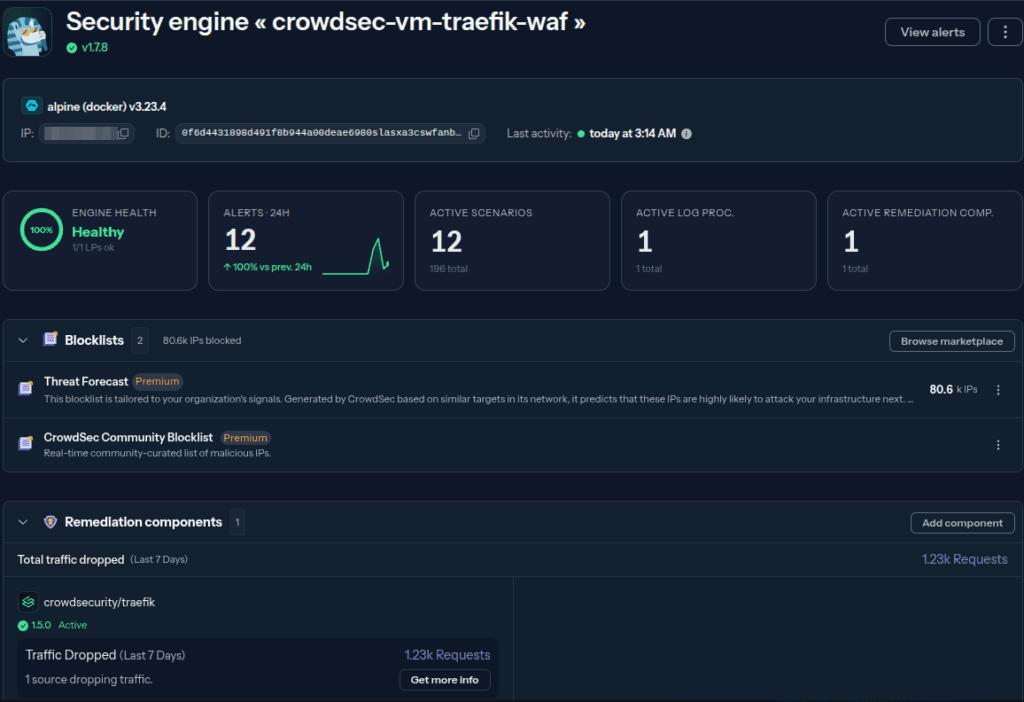
Key points:
- You enroll the engine, not the bouncer; the Traefik plugin appears in the Console through the engine it reports to.
cscli capi statusconfirms the community signal loop: sharing enabled, community blocklist pulling. That blocklist is the payoff of open source: every CrowdSec user’s confirmed attackers become IPs you block before they ever reach Traefik.- The Console is a lens on data that already lives on your box. Turn it off and the WAF keeps working exactly the same.
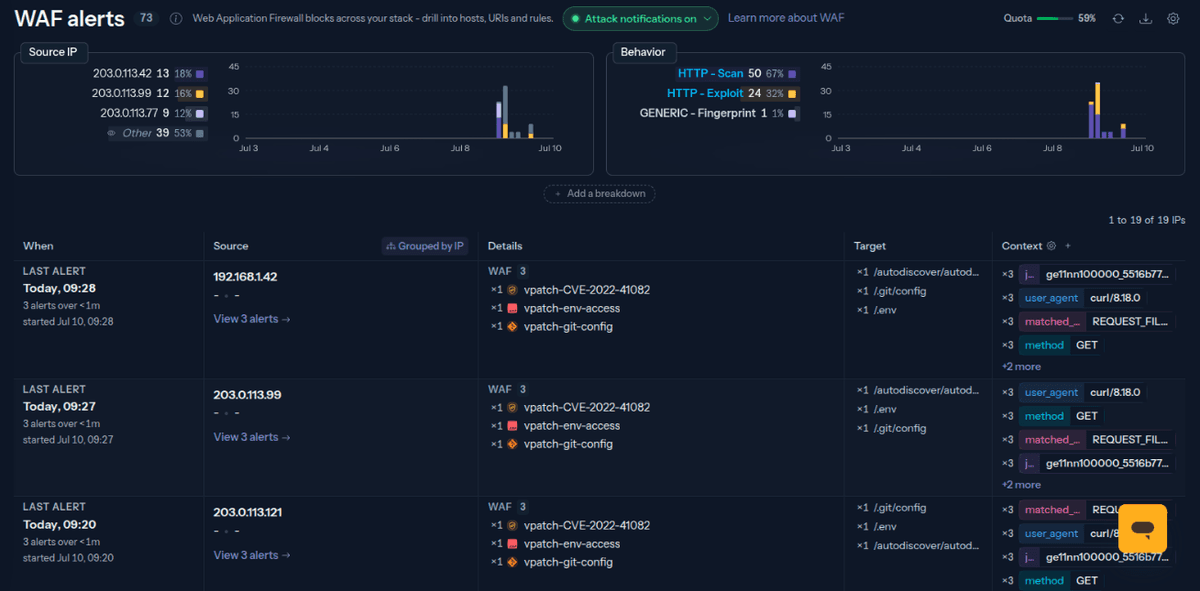
Where this leaves you
In a few minutes you went from an unprotected Traefik stack to an open-source WAF that:
- refuses known exploit shapes on sight, with virtually no false-positive risk;
- bans persistent attackers automatically, across every route Traefik serves;
- pulls a community-sourced blocklist so you benefit from attacks aimed at everyone else;
- reports into a single Console dashboard.
Virtual patching is the floor, not the ceiling. It only catches attacks it already knows by name. To catch the ones it doesn’t, the novel injection or the odd traversal, you bring in the OWASP Core Rule Set, and you decide whether to run it inband (block now) or out-of-band (watch first, block once you trust it). That is exactly the false-positive tradeoff virtual patching let you skip, and it is a natural next step from here.
You built all of this with software you can read, audit, and run for free. No black box, no vendor lock, no per-request meter. Just Traefik, refusing the requests that were never meant well.
Full documentation lives at docs.crowdsec.net/docs/appsec, the Traefik plugin is open at github.com/maxlerebourg/crowdsec-bouncer-traefik-plugin, and the rules are on the CrowdSec Hub.