
Robots.txt is a sign that says “please don’t” in a language only polite people read. It has worked exactly as well as you’d expect for thirty years. Unfortunately, defending yourself against bots that are unwilling to comply is something that is notably hard, and even more so if you don’t have thousands of dollars and the willingness to give up privacy.
But fear not, CrowdSec comes in to save the day as CrowdSec 1.8 ships bot protection!
What the challenge actually does
Bot detection ships inside CrowdSec’s WAF. While the WAF itself focuses more on virtual patching, CVE rules, and generic attack signatures (see Open-Source WAF for Nginx on Ubuntu with CrowdSec), we will focus purely on the bot detection feature.
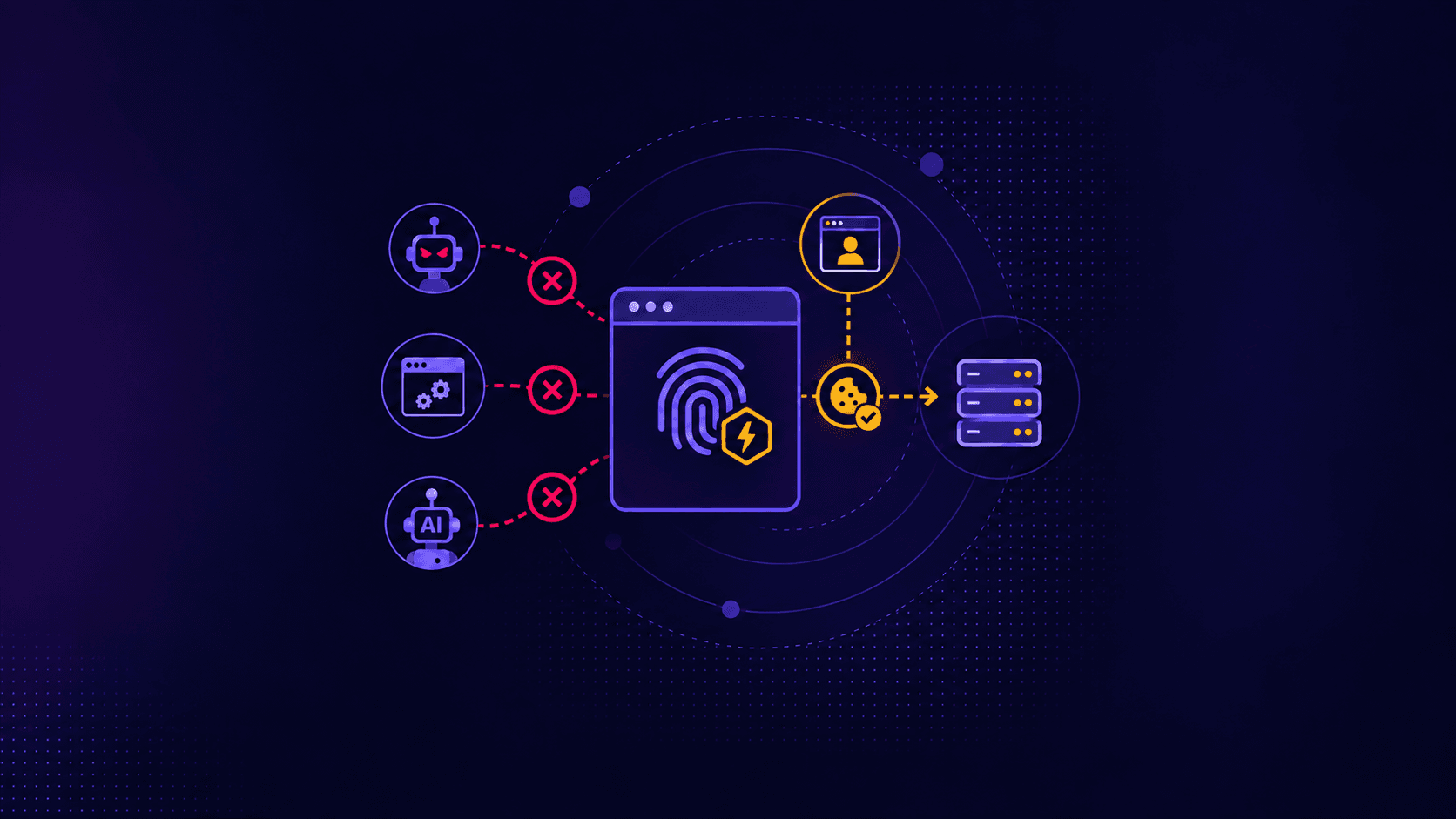
The bot detection answers one question: what is on the other end of the wire, a real browser or a script wearing one as a costume? It does that with a proof-of-work and device-fingerprint page in front of your app, in four beats:
- A request arrives with no valid challenge cookie. Instead of your page, the engine serves a small challenge page.
- That page runs three things in the browser: the open-source fpscanner fingerprinting library, a proof-of-work puzzle in a worker, and a per-epoch signing module.
- The browser POSTs the result to
/crowdsec-internal/challenge/submit. The engine validates the crypto and the PoW, then scoring rules look at the fingerprint and produce a verdict. - A client that passes gets a sealed
__crowdsec_challengecookie and is waved through until it expires (12 hours by default). A client that fails never reaches your origin.
A clarification, because the vocabulary here gets abused: This is not a captcha, nothing for a human to solve; the page solves itself.
Three kinds of clients, and what happens to each
Bots that do not run JavaScript are the easy tier. curl, wget, most scraping frameworks and every “I’ll just parse the HTML” script get the challenge page and stop there.
Naive automation is the second tier. Selenium, Playwright, Puppeteer, and anything driven over the Chrome DevTools Protocol will happily solve the proof of work (the PoW is only the ticket to the fingerprint check, which is where the filtering happens). They get caught on a declared-automation signal instead. All the fingerprints that are collected in the browser award scores, and if your score gets too high, you’re rejected. As an example, cdp, webdriver, selenium, playwright, and bot_user_agent are each worth 100 points on their own, which clears every shipped threshold.
The third tier is automation that knows all this and tries to hide those flags. This is the tier people write off, and the default config still catches a fair share of it. Hiding obvious flags gets you past two signals out of about two dozen, and the environment still has to hold up.
Does this make the barrier disappear? No. Nothing does. A patient adversary running a real browser on real hardware at a human pace is the case nobody solves, at any price, from any vendor. What you get is cost: their per-request budget goes up, and the cheap end of the scraping market (which is most of it) stops being profitable against you.
Setting it up on Nginx
Let’s start from an Ubuntu box that already serves something with nginx, and nothing else.
1. Install the engine.
curl -s https://install.crowdsec.net | sudo sh
sudo apt-get install -y crowdsec
The installer runs cscli setup for you, which detects your running services and wires the log acquisition on its own. On this box, it found nginx, sshd, postfix, and haproxy and installed the matching collections. That side of things is a happy accident here: we came for the bot challenge and got the log-based detection thrown in.
2. Install the bot challenge collection.
sudo cscli collections install crowdsecurity/appsec-bot-challengeThree bundles ship, and they differ only in where they draw the line:
| Collection | Rejects at score |
|---|---|
crowdsecurity/appsec-bot-challenge | ≥ 75 (balanced) |
crowdsecurity/appsec-bot-challenge-strict | ≥ 45 |
crowdsecurity/appsec-bot-challenge-permissive | ≥ 100 |
Install only one of them: if you install two, the strictest one silently wins.
3. Point a WAF listener at it. Create /etc/crowdsec/acquis.d/appsec.yaml:
listen_addr: 127.0.0.1:7422
appsec_configs:
  - crowdsecurity/appsec-bot-*
labels:
  type: appsec
source: appsec
Such a config carries only the bot-detection, which is what the second line below is telling you:
level=info msg="Loaded 0 inband rules" component=appsec_config
level=info msg="WAF challenge runtime initialized" cookie_ttl=12h0m0s max_cookie_len=4096 module=challenge pow_difficulty=20 rotation_interval=5m0s
WAF challenge runtime initialized is the line you want.
4. Install the bouncer.
sudo apt-get install -y crowdsec-nginx-bouncerThe package registers its own bouncer and key, drops the lua snippet into /etc/nginx/conf.d/, and reloads nginx. Then point it at the WAF:
sudo sed -i 's|^APPSEC_URL=.*|APPSEC_URL=http://127.0.0.1:7422|' \
    /etc/crowdsec/bouncers/crowdsec-nginx-bouncer.conf
sudo nginx -t && sudo systemctl restart nginx
That is the whole wiring.
Does it work?
Ask curl, the most honest bot you have on hand:
/                            200  293950 bytes   -> challenge page
/style.css                   404  162 bytes      -> origin page
/robots.txt                  404  162 bytes      -> origin page
Key points:
200with a 290 KB body means you are looking at the challenge page. The engine answers the bouncer with an envelope, and the bouncer renders the page inside it with the status the envelope asks for./style.cssand/robots.txtskipped the challenge entirely. The collection ships path exclusions for static assets, crawler files, feeds, API paths, and webhooks.
Now point an automated browser at it. Anything CDP-driven does the job: Puppeteer, Playwright, or a Chrome started with --remote-debugging-port. It solves the puzzle, submits, and:
level=info msg="on_challenge_submit rejected" automation=true is_bot=true \
  reason="request score 100" signals="[cdp]" source=203.0.113.7 \
  timezone=Europe/Paris url="http://198.51.100.10/no-bots-please/"
level=info msg="WAF bot-detection: 203.0.113.7 rejected by crowdsecurity/rejected-browser-submission (request score 100)"
Key points:
signals="[cdp]"is the whole story: the Chrome DevTools Protocol was live in that browser, which is worth 100 points on its own.reason="request score 100"against a balanced threshold of 75, so the submission is refused and no cookie is issued.automation=trueandis_bot=trueare the engine’s summary flags.
The nginx access log shows the same thing from the other side, and it is the clearest picture of the protocol:
"GET /no-bots-please/ HTTP/1.1" 200 139306
"GET /crowdsec-internal/challenge/fpscanner.js HTTP/1.1" 200 36328
"GET /crowdsec-internal/challenge/pow-worker.js HTTP/1.1" 200 7544
"POST /crowdsec-internal/challenge/submit HTTP/1.1" 200 32
In layman’s terms: the bot got the challenge page, downloaded the fingerprinting library and the PoW worker, did the work, submitted, and got 32 bytes of rejection JSON back. There is no fifth line. It never reached the page.
The alert lands with kind set to bot-detection:
| ID | value           | reason                                    | decisions | kind          |
| 2  | Ip:203.0.113.7  | crowdsecurity/rejected-browser-submission |           | bot-detection |
The decisions column is empty on purpose. One rejection records the catch without banning anyone, which is the right default: a single odd fingerprint is weak evidence. Keep the bot running, and crowdsecurity/appsec-bot-challenge-too-many-submissions fills up (5 submissions in 20 seconds) and turns it into a real decision. A human browser solves once, takes its cookie, and stops submitting, so it never goes near that bucket.
sudo cscli metrics show bot-detection| Bot Detection | Requested | Submitted | Solved | Granted | Exempt | Submissions Rejected |
| 127.0.0.1:7422/ | 3 | - | - | - | 2 | - |
How CrowdSec bot detection compares to the commercial anti-bot vendors
Let’s be fair about the starting position: Cloudflare, Akamai, DataDome, and the rest have been doing anti-bot for years, and we are the newcomers in this particular field.
However, we have a couple of hundred thousand CrowdSec installations sitting on a couple of hundred thousand different networks, each an independent vantage point, each reporting what actually hit it into a pool everyone pulls from. When a scraper works its way down a list of targets, the ones it reaches later already know about it.
Tenure is worth less in 2026 than it used to be, though. Detection and evasion are being rewritten on a much shorter cycle now, with the same tooling on both sides, so a long head start matters less than how fast you can change your own rules. Which brings us to the part that separates these products.
With a managed vendor, the thing deciding whether your visitor is a human is a black box you rent. You get a dashboard, a sensitivity slider, and a score you cannot audit. When it is right, fine. When it is wrong, you file a ticket.
With CrowdSec, the scoring is a file you can cat:
# /etc/crowdsec/appsec-configs/appsec-bot-challenge-scoring.yaml
- filter: EvaluateMismatches().Has("cdp")
  apply:
    - AddRequestScore(100, "cdp")
And the threshold that acts on it is four lines:
name: crowdsecurity/appsec-bot-challenge-scoring-balanced
inband:
  on_challenge_submit:
    - filter: RequestScore() >= 75
      apply:
        - 'RejectSubmission("request score " + string(RequestScore()), "verbose")'
That is the entire decision. Read it, diff it, change it. I would rather argue with a YAML file than with a support queue.
A few concrete things follow from that:
- Your users’ traffic stays on your infrastructure. A cloud anti-bot service is a reverse proxy: it terminates TLS, so every request body, cookie, and credential your users send transits a third party in the clear on their side. CrowdSec computes the fingerprint in the browser and scores it in the engine on your own box, and nothing about your visitors leaves your infrastructure for that decision to be made.
- False positives are debuggable. Block a legitimate visitor, and score_reasons on the alert tells you which signals fired and what each was worth. You re-weight the offending one yourself in about four lines, rather than reporting it upstream and waiting.
- Cost does not scale with the attack. Per-request pricing has an awkward property: your popularity with the wrong people increases your bill. Metering differs by vendor and by plan, so the arithmetic is yours to do, and the shape holds either way: your bill tracks their volume. Self-hosted costs you some CPU on a box you already pay for.
- Leaving is an
apt purge. DNS-layer onboarding is great until the day you want to move, at which point your exit is a DNS migration. Here, it is uninstalling a package.
However, self-hosting means you own the tuning. If your threat model is a 2 Tbps DDoS, buy the CDN. If it is scrapers, credential stuffing, scalpers, and AI crawlers eating your content, you can do this yourself, on your own terms, for free.
Going further
Out of the box, every request gets challenged, which might not be what you want.
Nearly all of it is one custom appsec-config. Write yours under /etc/crowdsec/appsec-configs/, and list them by name in your acquisition: the crowdsecurity/appsec-bot-* glob does not match your namespace.
Challenge only the part of the site that matters
Invert the problem and exempt everything except the funnel you care about.
name: mycorp/appsec-bot-challenge-path-scope
inband:
  pre_eval:
    - filter: >-
        !(req.URL.Path startsWith "/no-bots-please/")
      apply:
        - ExemptFromChallenge("outside-protected-path")
Swap the path for whatever actually matters on your site.
Per host works the same way with req.Host, though proxies sometimes forward foobar.com:443 rather than the bare host, so prefer startsWith or endsWith ".foobar.com".
Check your work with the exempt counters, which break down by reason:
| Bot Detection — Exempted                         |
+-----------------+------------------------+-------+
| Appsec Engine   | Reason                 | Count |
+-----------------+------------------------+-------+
| 127.0.0.1:7422/ | googlebot              | 1     |
| 127.0.0.1:7422/ | outside-protected-path | 24    |
| 127.0.0.1:7422/ | static                 | 1     |
+-----------------+------------------------+-------+
| Total           |                        | 26    |
Twenty-four requests skipped the challenge for sitting outside the protected path; one was a verified crawler, and one a static asset.
Let your own bots through
Your uptime monitor, your internal crawler, your partner’s integration. MatchKnownBot checks a JSON definition file, and its rule is deliberately strict: (user-agent matches AND at least one path matches) AND (exact IP OR CIDR range OR forward-confirmed reverse DNS).
{"name":"mybot","user_agent":"mycorp-monitor","paths":["^/health(/|$)"],"ranges":["10.42.0.0/16"],"ips":["192.0.2.77"]}name: mycorp/appsec-bot-challenge-known-bot
inband:
pre_eval:
- filter: MatchKnownBot(req.RemoteAddr, req.UserAgent(), req.URL.Path, "legit_bots/mybot.json")
apply:
- ExemptFromChallenge("mybot")
data:
- source_url: https://example.com/mybot.json
dest_file: legit_bots/mybot.json
type: botsThe data: block is not optional even when you place the file yourself: only declared files get registered in the datafile registry. A definition carrying only a user-agent, with no IP, range, or rDNS, is rejected outright at load. A user-agent proves nothing at all.
This is how the shipped good-bot exclusions work too. The googlebot definition carries no IP list at all:
{"name":"googlebot","user_agent":"googlebot","rdns":["(^|\\.)googlebot\\.com$"]}Everything rests on forward-confirmed reverse DNS: resolve the IP to a name, resolve that name back, check they agree. A scraper setting User-Agent: Googlebot/2.1 from a random VPS gets challenged like everyone else. Anchor your own rDNS patterns the same way, or evilgooglebot.com will match.
Waive the challenge for a specific user
For an authenticated session or an internal probe, GrantChallengeCookie hands out the cookie directly rather than exempting a single request:
name: mycorp/appsec-bot-challenge-internal-probe
inband:
  pre_eval:
    - filter: req.Header.Get("X-Internal-Probe") == "s3cr3t" && req.RemoteAddr startsWith "10."
      apply:
        - GrantChallengeCookie("internal-probe", "24h")
The client gets a 307 back to where it was going, carrying the cookie. Note that a shared-secret header on its own is a bypass token from the moment it leaks, so this is a purely technical example.
Re-weight the scoring for your own traffic
Every signal’s value is a line in a YAML file, so tune it for the audience you actually have:
name: mycorp/appsec-bot-challenge-reweight
inband:
  on_challenge_submit:
    # A UTC-only audience is unusual for us, so treat it as stronger evidence.
    - filter: EvaluateMismatches().Has("utc_timezone")
      apply:
        - AddRequestScore(45, "utc_timezone_mycorp")
    # We are mobile-first, so a mobile UA mismatch is expected noise.
    - filter: EvaluateMismatches().Has("ua_mobile")
      apply:
        - AddRequestScore(-15, "ua_mobile_expected")
Scores can go negative, and you can add evidence the fingerprint cannot see, such as a checkout hit with no Referer.
Load order is not cosmetic here. RejectSubmission() is terminal: it halts every remaining on_challenge_submit rule. So your re-weighting has to load after the scoring engine and before the threshold config, which means listing them explicitly instead of leaning on one glob:
listen_addr: 127.0.0.1:7422
appsec_configs:
  - crowdsecurity/appsec-bot-challenge-exclude-*
  - mycorp/appsec-bot-challenge-path-scope
  - mycorp/appsec-bot-challenge-known-bot
  - mycorp/appsec-bot-challenge-internal-probe
  - crowdsecurity/appsec-bot-challenge-scoring
  - mycorp/appsec-bot-challenge-reweight
  - crowdsecurity/appsec-bot-challenge-scoring-balanced
labels:
  type: appsec
source: appsec
The quickest way to convince yourself is to break it on purpose. Drop a temporary rule subtracting 60 points from cdp, then send the same CDP browser that scored 100 and got rejected earlier. 100 - 60 = 40, comfortably under the balanced threshold of 75:
"GET /no-bots-please/ HTTP/1.1" 200 140417     ← challenge page
"POST /crowdsec-internal/challenge/submit HTTP/1.1" 200 25     ← accepted
"GET /no-bots-please/ HTTP/1.1" 200 231        ← the real page
| Bot Detection | Requested | Submitted | Solved | Granted | Exempt |
| 127.0.0.1:7422/ | 4 | 1 | 1 | 1 | 3 |Same browser, same box, one config file moved into one position, opposite verdict. Solved: 1, cookie issued, origin page delivered in 231 bytes.
Where this is at
Bot detection is marked alpha upstream; however, it works, it is in 1.8.0, and we run it.
The scoring rules are hub content, so they are only as good as what the community feeds back into them. Found a signal that misfires on your traffic, or a bot family that walks straight through? That is a useful bug report: open an issue on the Hub, or hop onto our Discord and tell us what you are seeing. We would rather fix a signal than ship a slider. 🙂