By Manuel Sabban, CrowdSec
The bots that cause real trouble on a web server today run Chrome.
Most of them use a headless Chrome driven by Playwright or Puppeteer, with a user agent copied from a current browser release and a pool of residential IPs behind it. These bots accept cookies, run JavaScript, and wait between page loads about as long as a person would. Look for them in your HAProxy logs, and you’ll mostly find requests that look exactly like your regular visitors, because that layer tells them nothing apart. HAProxy sees HTTP traffic. Whether a person or a script produced it is something it can’t work out on its own.
CrowdSec’s bot detection answers that question in the browser itself. When a client needs checking, CrowdSec serves a challenge page that collects a fingerprint from the browser and turns it into a score. The SPOA bouncer hands that score to HAProxy, and your own HAProxy rules decide what happens to the request.
CrowdSec’s new bot detection feature serves a browser challenge, collects a fingerprint, scores the result, and lets the edge decide what to do with the request. The goal is to allow any human-controlled browser to pass and let good bots in.
This post focuses on the HAProxy-specific wiring for this new bot detection feature and will use a fresh Debian 13 with native HAProxy installed as an example.
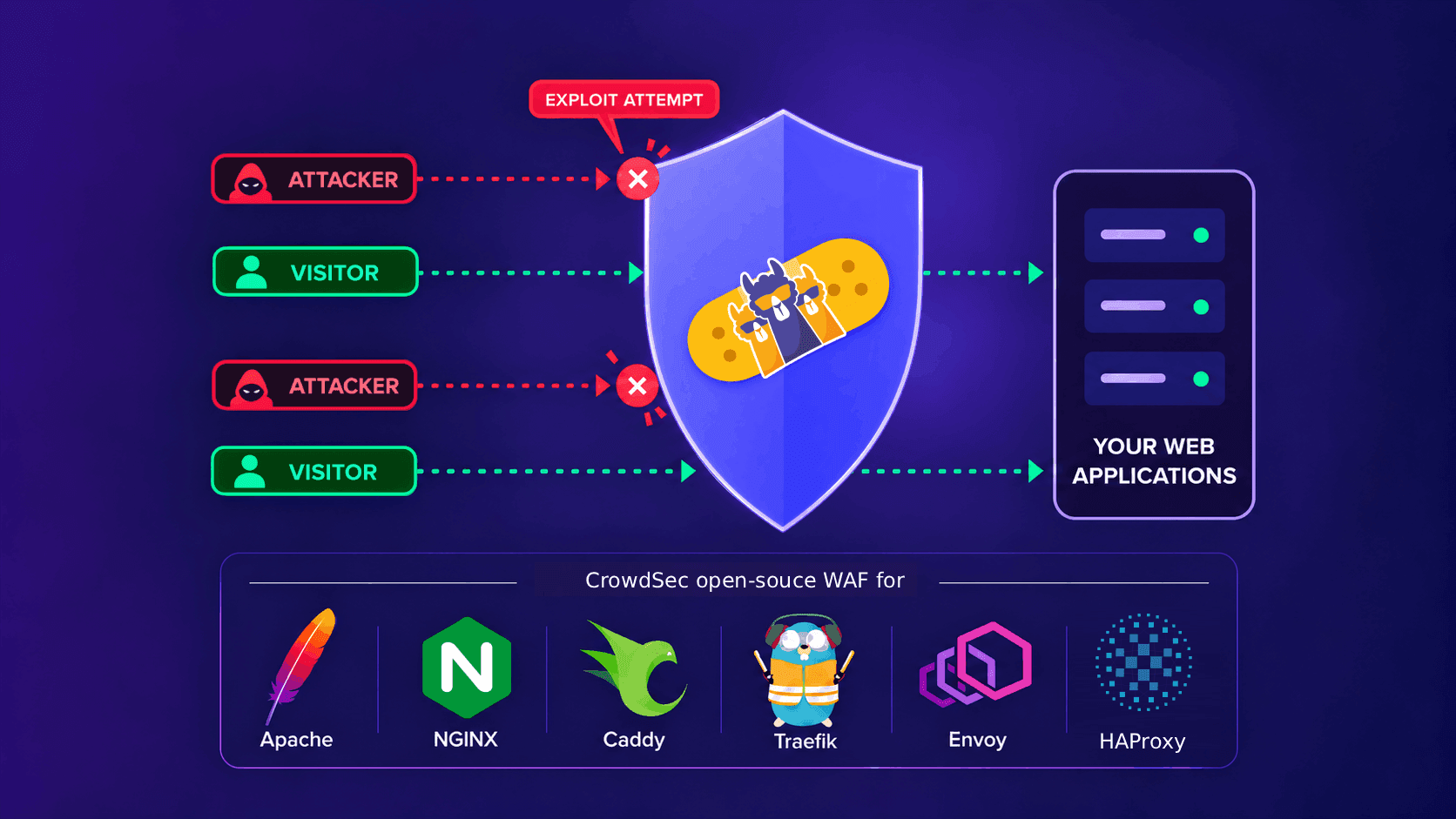
The bot detection feature is provided through the CrowdSec WAF datasource, which acts as an advanced web application firewall (WAF) for robust bot mitigation and enhanced web security. It allows each incoming request to be analyzed by CrowdSec to determine whether it originates from a legitimate user or an automated client. On the other hand, the HAProxy bouncer is responsible for serving the challenge to the client and applying the resulting remediation.
The documentation for this feature is therefore split into two complementary parts:
- https://docs.crowdsec.net/docs/appsec/bot_detection/intro/ covers the CrowdSec AppSec side of bot detection, including the detection and challenge mechanisms, and is relevant to all CrowdSec bot detection deployments regardless of which remediation component is used.
- https://docs.crowdsec.net/u/bouncers/haproxy_spoa/#bot-detection-challenge covers the HAProxy-specific remediation side and explains how the HAProxy bouncer integrates with CrowdSec AppSec to serve the challenge to clients when required
The testbed
The machine runs:
Debian 13 (trixie)
CrowdSec 1.8.1
HAProxy 3.0.11
crowdsec-haproxy-spoa-bouncer 0.4.0
The CrowdSec engine comes from the normal Packagecloud installer. On Debian-like systems, that installer creates the any/any repository entry directly:
curl -s https://install.crowdsec.net | sudo sh
sudo apt-get install -y crowdsec haproxy crowdsec-haproxy-spoa-bouncer
Wire HAProxy to the SPOA bouncer
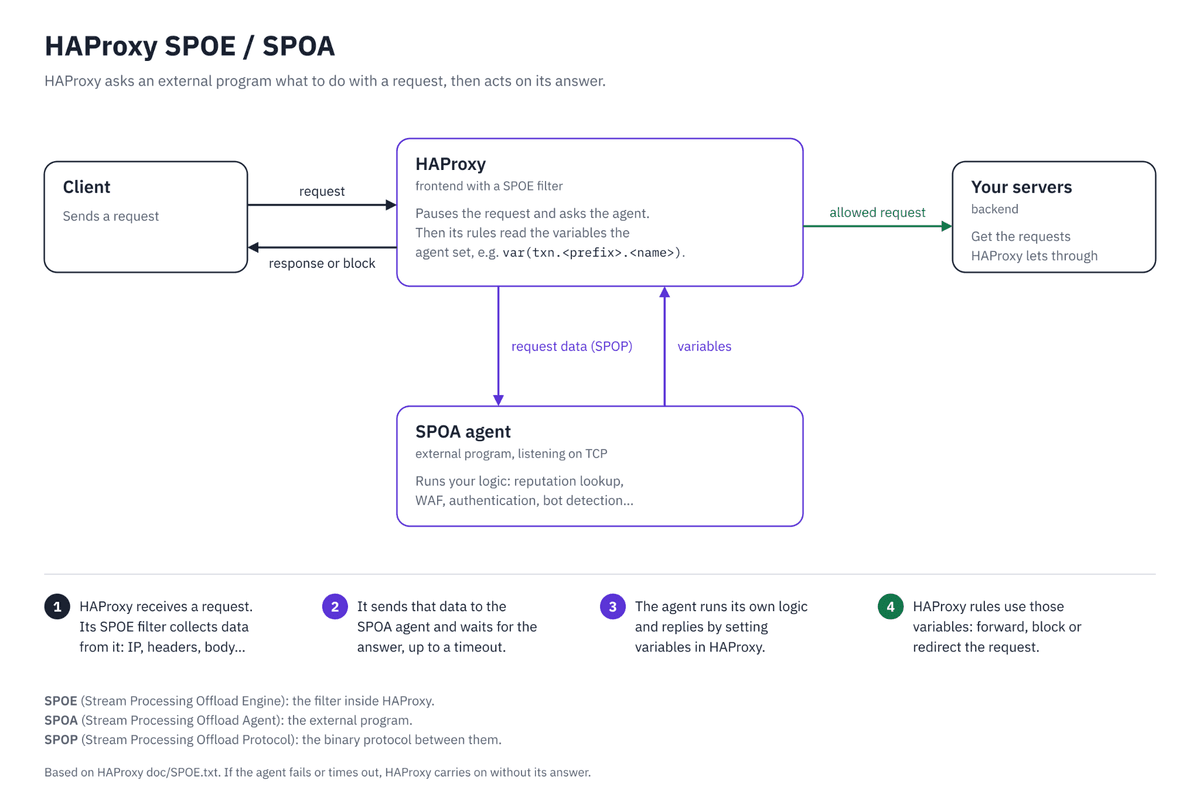
The package ships an example configuration. It already contains the pieces we need: the SPOE filter, the TCP SPOA backend, and the HTTP backend used to relay challenge pages and assets.
For the complete request lifecycle and the failure cases, see the repository’s HAProxy challenge protocol document. The official installation and configuration reference is the live CrowdSec HAProxy SPOA bouncer documentation. For the WAF side of the setup, use the HAProxy AppSec QuickStart.
The relevant HAProxy parts look like this:
filter spoe engine crowdsec config /etc/haproxy/crowdsec.cfg

acl crowdsec_challenge_backend_path path_beg /crowdsec-internal/challenge/
acl is_challenge var(txn.crowdsec.remediation) -m str "challenge"

http-request set-path %[var(txn.crowdsec.challenge_url)] if is_challenge { var(txn.crowdsec.challenge_url) -m found }
use_backend crowdsec-challenge if is_challenge { var(txn.crowdsec.challenge_url) -m found }
use_backend crowdsec-challenge if crowdsec_challenge_backend_path

backend crowdsec-spoa
    mode tcp
    server spoa 127.0.0.1:9000

backend crowdsec-challenge
    mode http
    server s2 127.0.0.1:9100
Validate it before restarting HAProxy:
sudo /usr/sbin/haproxy -c -f /etc/haproxy/haproxy.cfg
sudo systemctl restart haproxy
Enable the challenge relay
The bouncer needs three settings for AppSec and browser challenges:
appsec_url: http://127.0.0.1:7422/
appsec_timeout: 500ms
challenge_http_listen: 127.0.0.1:9100
Setting challenge_http_listen ensures that the bouncer seamlessly delivers the challenge body whenever AppSec issues a challenge decision, enabling a smooth user verification flow instead of falling back to the ban page.
After restarting the bouncer, the listeners are visible:
127.0.0.1:9100  crowdsec-spoa-bouncer
*:9000          crowdsec-spoa-bouncer
Install bot detection
The balanced bundle installs the scoring engine, the challenge threshold, path exclusions, crawler handling, and the scenarios used for repeated failures:
sudo cscli collections install crowdsecurity/appsec-bot-challengeThis is the HAProxy-specific test described alongside the general bot detection installation and verification steps.
The collection uses the balanced scoring policy. Each browser submission gets a score from signals collected by the challenge, and the policy rejects scores at or above its threshold:
balanced:   reject at 75+
strict:     reject at 45+
permissive: reject at 100+
Balanced is a useful starting point: it catches strong automation signals while giving unusual but legitimate browsers more room. The headless Chromium in this test scored 155, so every policy would reject it. Choose one bundle at a time. If you install balanced, strict, and permissive together and load them with a wildcard, their rules can stack, and the strictest threshold may effectively win.
Then create /etc/crowdsec/acquis.d/appsec.yaml:
listen_addr: 127.0.0.1:7422
appsec_configs:
  - crowdsecurity/appsec-bot-*
labels:
  type: appsec
source: appsec
The glob expands against the installed bot-detection AppSec configurations. The engine must be reloaded after the collection and acquisition files are present:
sudo crowdsec -t
sudo systemctl reload crowdsec
The log confirms that the runner is ready:
Appsec listening on 127.0.0.1:7422
Appsec Runner ready to process event
WAF challenge runtime initialized ... pow_difficulty=20
What happens to the first request?
The first request is not a failed request. It is the start of a small internal conversation between HAProxy, the SPOA bouncer, and AppSec:
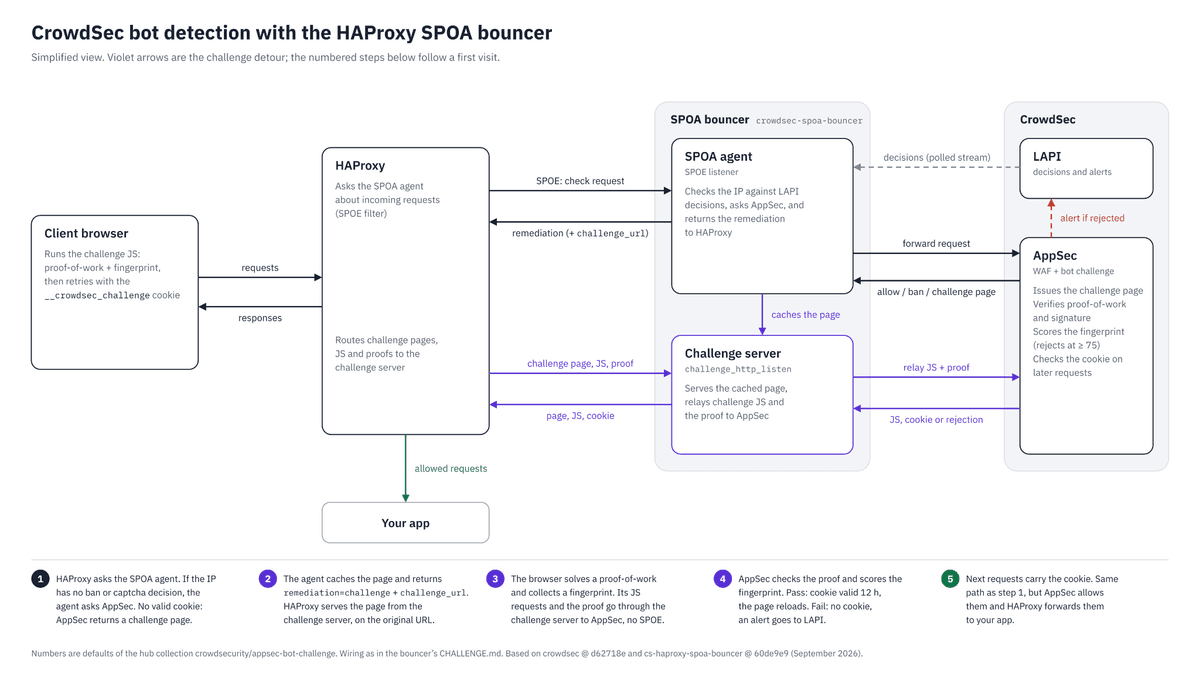
The sequence is easy to follow in time order. First, the client requests /. AppSec asks for a challenge, so the bouncer stores the challenge response and gives HAProxy a tokenized path, /crowdsec-challenge/<token>. HAProxy rewrites the request to that path and sends it to the bouncer’s challenge listener. This is an internal HAProxy rewrite: the browser does not see the tokenized path and still considers its request to be /.
The bouncer serves the challenge page and sets the __crowdsec_challenge_relay cookie. The cookie contains the relay token, is HttpOnly, is scoped to /crowdsec-internal/challenge/, and lasts five minutes.
The challenge page’s HTML and JavaScript then tell the browser to request fpscanner.js, the proof-of-work worker, and finally the submission endpoint under /crowdsec-internal/challenge/. These are browser-visible URLs, so the browser sends those requests itself and includes the cookie automatically. The bouncer uses the cookie to find the stored AppSec relay, restores the original internal path, and forwards each request to AppSec. A missing, malformed, unknown, or expired cookie gives the bouncer no relay to look up, so it returns 404 without calling AppSec.
Try the request yourself:
curl -sS -D /tmp/bot.headers -o /tmp/bot.html \
  -H "Accept: text/html" http:///
The result on the testbed:
HTTP/1.1 200 OK
297099 /tmp/bot.html
1
set-cookie: __crowdsec_challenge_relay=...; Path=/crowdsec-internal/challenge/; Max-Age=300; HttpOnly; SameSite=Lax
The body contains the CrowdSec challenge page. The browser assets are then relayed through the internal challenge path. For example, this request goes back through HAProxy and reaches the bouncer’s challenge HTTP listener at :9100:
GET /crowdsec-internal/challenge/fpscanner.js
HTTP/1.1 200 OK
36315 bytes
The WAF returning the challenge page is only the first step. The asset requests and final submission must also reach the bouncer for the check to complete.
Let a browser try
Now let’s run the flow through a CDP-controlled headless Chromium instance. The browser loads the challenge, submits its fingerprint, and gives CrowdSec an automation signal to evaluate:
Run it with:
❯ google-chrome --enable-automation --user-data-dir=/tmp/bot-test The bot-detection metrics show the same event:
sudo cscli metrics showCrowdSec also created a bot-detection alert for crowdsecurity/rejected-browser-submission. One rejected submission does not create a ban. That is deliberate: a fingerprint rejection is evidence, and the shipped repeated-submission scenarios handle the escalation path.
What changes at the edge
The interesting part is how cleanly the responsibilities split: WAF evaluates the request, and the browser fingerprint and the SPOA bouncer carry the decision and the challenge assets. HAProxy keeps the application behind the edge. CrowdSec records the result, exposes the score and signals, and can escalate repeated failures through its normal scenario machinery.
That gives the edge a useful middle ground: a real browser can clear the check, while automated browsers have to spend time and compute before they reach the application. Operators get a CrowdSec alert and a reason such as headless_screen_resolution, bot_user_agent, or swiftshader_renderer, rather than another opaque user-agent rule.
A rejected submission doesn’t trigger a ban on its own. Instead, it feeds CrowdSec scenarios, which give administrators the data they need to tune their deployment.
This first pass ran on a single Debian machine with one HAProxy instance. The most useful next step is to try the same wiring with your own application paths and traffic mix, then share what you learn with us. The challenge flow is small, its signals are easy to inspect, and it gives the edge a far better question to answer than “does this request have a suspicious user-agent?”